Trying to Understand PSBT
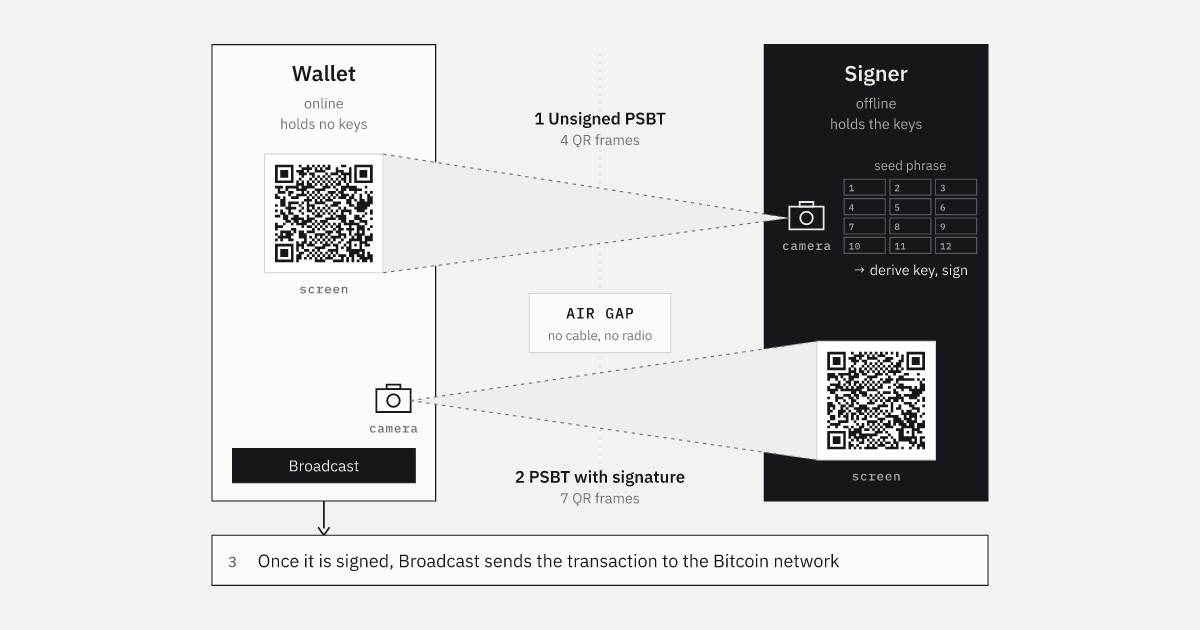
I wrote about SeedSigner, but if I'm honest, I still don't understand PSBT very well. It made me wonder what exactly we send over the air gap. I'm also thinking about building my own DIY signer, so I wanted to understand it better. I worked through a small example and wrote down what I found.
What a PSBT is
A PSBT (Partially Signed Bitcoin Transaction) is a binary format for exchanging a transaction before all its signatures are in place, defined in BIP174. It was proposed in 2017 and added to Bitcoin Core as RPCs in version 0.17.
 BIP174: Partially Signed Bitcoin Transaction FormatA format that carries, along with the transaction, what a signer needs to sign it. Status: Deployedgithub.com
BIP174's abstract describes a PSBT as a format that carries the information needed for signing and holds partial signatures until all signatures are in place. Since the required information travels with the transaction, a signer can work offline.
The motivation section describes two problems:
- Each wallet had its own way to pass an unsigned transaction to several signers, so different wallet software could not exchange them.
- Signing requires information about the UTXOs being spent, but air-gapped and hardware wallets cannot look up the UTXO set themselves.
With an air-gapped signer, the flow looks like the figure below: the wallet and signer exchange PSBT data as animated QR codes. Compatibility between them comes down to whether both can handle this PSBT format.
How each role uses a PSBT
As the figure shows, the wallet and signer send different data to each other. BIP174 defines the processing of a PSBT in terms of roles. One piece of software can take on several roles, as many implementations do.
| Role | Figure participant | What it does |
|---|---|---|
| Creator | Wallet | Builds the unsigned transaction and puts it in a PSBT, with empty input and output maps |
| Updater | Wallet | Adds what it knows: the UTXOs spent, scripts and BIP32 derivation paths |
| Signer | Signing device | Checks the contents and adds partial signatures for the inputs its keys can sign |
| Combiner | Wallet (multi-signer flow) | Merges several PSBTs for the same transaction into one |
| Input Finalizer | Wallet | Builds the scriptSig / scriptWitness of inputs that have all their signatures |
| Transaction Extractor | Wallet | Pulls a network-ready transaction out of a PSBT whose inputs are all complete |
Bitcoin Core's doc/psbt.md lists the roles performed by each RPC. For example, walletcreatefundedpsbt performs Creator and Updater, walletprocesspsbt performs Updater, Signer and Finalizer, and finalizepsbt performs Finalizer and Extractor.
Bitcoin Core doc/psbt.mdPSBT Howto for Bitcoin Core: the workflow by role and the matching RPCsgithub.comIn the figure, the signer adds its signature, then the wallet completes and broadcasts the transaction. A Signer can add information but must not remove anything from the PSBT it received. The wallet and signer exchange the PSBT as UR text carried by QR codes.
From payment details to UR
A PSBT is binary, but in an air-gapped workflow we usually see it as a QR code. UR (Uniform Resources) is a format for carrying binary data over QR codes, defined by Blockchain Commons. It is not a BIP, but many air-gapped devices and wallets use it.
BCR-2020-005: Uniform ResourcesTurns binary into typed, URI-like text and splits it across several QR codesgithub.comHere is how the payment information becomes a PSBT, then UR text and QR codes, from the sender's side.
The sender builds the data in this order:
- Enter the payment in the wallet. Specify the recipient, amount and fee. The wallet selects the coins to spend and provides the derivation path for the signing key.
- The wallet creates a PSBT. The Creator puts an unsigned transaction reflecting the payment in the global map. The Updater adds the spent coin's information (witness UTXO) and the key's derivation path to the input map.
- Serialize the PSBT as bytes. The PSBT in this example is 187 bytes. Before UR encoding, the data is binary.
- Wrap it in CBOR. The PSBT bytes go into a CBOR byte string, and a CRC32 checksum is computed for the whole message. The leading
58 bbmeans a byte string of 187 bytes. - Split it to fit QR codes. Here, the data is split into 48-byte pieces. Each piece is wrapped in a CBOR array called a
part, which records its sequence number, the total number of pieces, the original length and the overall checksum. - Encode it as Bytewords. Each byte in a
partis replaced with two letters, and the part's own CRC32 is appended. The result uses uppercase letters, digits and/:-, which fit QR alphanumeric mode. - Turn the UR text into a QR code.
UR:CRYPTO-PSBT/1-4/identifies the type ascrypto-psbtand marks this as the first of four frames.
The PSBT as bytes
The flow makes sense, but what is actually in the binary data? Here, I look at the bytes of the recovered PSBT.
This article covers BIP174 version 0, which stores the unsigned transaction in the global map.
BIP370 version 2 does not contain an unsigned transaction. Instead, it stores the transaction's parts in separate maps so inputs and outputs can be added later.
BIP370: PSBT Version 2Drops PSBT_GLOBAL_UNSIGNED_TX and keeps the parts of the transaction in each mapgithub.comThe bytes are laid out 16 per row.
After the magic, a PSBT contains maps made of key length → key → value length → value records. A key length of 00 marks the end of a map. Lengths use CompactSize; every length in this example is below 253, so each takes one byte.
The unsigned transaction inside the global map
In PSBT v0, the value of global key 00 is the unsigned transaction. Its bytes break down further according to the transaction format.
| Field | Bytes | Meaning |
|---|---|---|
| version | 02 00 00 00 |
Transaction format version (little-endian) |
| input count | 01 |
One input |
| prevout | 00 × 32 · 00 00 00 00 |
ID of the previous transaction (dummy) and output index 0 within it |
| scriptSig length | 00 |
Empty, since it is unsigned |
| sequence | ff ff ff ff |
The input's sequence value |
| output count | 01 |
One output |
| amount | 00 e1 f5 05 00 00 00 00 |
100,000,000 sat (1 BTC), little-endian |
| scriptPubKey | 16 · 00 14 · 11 × 20 |
22 bytes. A dummy script shaped like P2WPKH |
| locktime | 00 00 00 00 |
No locktime |
The recipient and amount are recorded in the unsigned transaction. A signer reads this transaction to display who gets how much.
Input and output map contents
The input map holds signing information that is not part of the transaction itself. This example has two keys.
The value of key type 01 witness UTXO consists of an 8-byte amount, a script length and the script. Here it contains 1 BTC and a P2WPKH script: the output that the unsigned transaction's prevout points to, included for the signature calculation.
Key type 06 BIP32 derivation has a public key in the key and a 4-byte fingerprint plus a derivation path in the value. Here the path is m/84'/0'/0'/0/7. It is not a private key; it tells the device which of its keys to use for signing.
The parser treats derivations with a matching fingerprint as candidates, then checks whether the derived key is valid for P2WPKH or a specific Taproot key path.
In PSBT v0, the unsigned transaction in the global map determines how many input and output maps follow. The output map in this example is empty and contains only the terminating 00. The output amount and scriptPubKey are in the unsigned transaction, so no additional data is needed in the output map to read the payment details.
The signer walks it back and signs
The signer receives the QR codes and restores the PSBT in reverse order:
- Read the UR text from each QR code, decode Bytewords back into bytes and check each
part's CRC32. - Use the frame numbers to assemble the fragments, verify the overall checksum and unwrap the CBOR.
- Extract the original PSBT bytes and read the payment details, spent coin and key derivation path. The frames can arrive in any order.
The signer checks four things before returning the PSBT:
- Review the payment. Display the recipient, amount and fee for the user to confirm before signing. The fee is not in the PSBT; the device calculates it by subtracting the total outputs from the total spent coins.
- Calculate the sighash. For SegWit v0, BIP143 hashes the unsigned transaction together with the amount and script of the spent coin. The signature is made over this 32-byte hash. If the PSBT gives a false amount, a signature based on it will not be accepted by the network.
- Derive the private key. The key does not come from the PSBT. The device turns the seed phrase into a seed with BIP39, then follows the derivation path in the PSBT (
m/84'/0'/0'/0/7) with BIP32. It also checks that the master fingerprint belongs to the device and that the derived public key matches the spent coin's script. - Sign and add the signature. The signer uses the sighash and private key to create an ECDSA signature on secp256k1. It verifies the signature, then adds it to the input map as a partial signature (
PSBT_IN_PARTIAL_SIG, key02+ public key). In this example, the PSBT grows from 187 to 294 bytes and returns to the wallet across seven QR frames.
Trying it with my own signing module
I have been developing jitsu-in, a signing module for my own DIY signer. The main target is microcontrollers such as the Raspberry Pi Pico 2, but it is built on WebAssembly and can run anywhere with a WASM runtime.
The demo below uses parser.wasm to read a PSBT restored from QR codes. It shows the animated QR reception progress, the recovered PSBT hex and the plan used by the signing device. You can also point a real camera at a PSBT UR and scan it.
This parser.wasm supports PSBT v0, up to 32,768 bytes, with up to 16 inputs and 16 outputs. It supports URs split across up to 1,024 frames. PSBT v2 is not supported yet.
When the fourth QR frame arrives, the 187-byte PSBT is restored and parser.wasm builds a plan. The plan lists the payment details, input amount and key derivation path shown above.